Examples Overview
This section provides a set of examples of component templates, and template sections grouped by functionality that you can take and customize for your own templates. You can see these examples on our Templates Gallery repository which is part of the Witboost Starter Kit.
Overview
We provide several different sections of examples, going from the explanation of the templates' Basic Fields, to a scaffold for Data Product, Storage, Workload and Output Port templates that you can further expand based on your environment and technology requirements. We also provide advanced guides on Nunjucks patterns, environment configuration, and a Skeleton Entity Output Port variant for Witboost 2.3+.
This Templates Gallery examples are meant to be a more hands-on and code-ready experience than the Witboost documentation on the customization of templates, but the latter still acts as a valuable comprehensive resource on how to configure each type of field.
- Basic Fields: Learn about the different kinds of primitive (string, numbers, dates, etc.) fields you can create and how to configure them to allow for input validation, styling, and more.
- Layouts: Learn how to organize your template to offer a better user experience. Set up tables, row layouts, etc. to take your forms to the next level.
- Conditional Fields: Learn how to configure your template to offer different sets of fields depending on the choices and inputs from the user, allowing for more rich and complex templates.
- Table Schema Layout: Data often revolves around tables, and defining its schema is vital for ensuring operability and quality. Learn how to define a table layout compliant with the OpenMetadata table schema that you can use when defining tables.
- Retrieve Data: Learn how to set up fields to retrieve data from other sources and inject them into your form. This section explains how to retrieve information from the form itself or from the Witboost catalog entities.
- Dynamic Select: Tightly related to Retrieve Data, learn how to retrieve information from other sources to configure the choices offered to the user, either from the form itself, from the Witboost catalog or from external sources; improving the component creation experience and guaranteeing interoperability of Witboost entities. This section explains how to query the Witboost catalog to retrieve different kinds of entities you will need when creating a new one.
- Transforming Entities: Learn how to transform the shape of the data created or retrieved on your form, to suit the requirements of the entity or action your template will create.
- Component Metadata: Learn how to define the common section of any component template, where we define the necessary metadata fields to identify an entity on Witboost.
- Base Data Product: We offer a base example for a Data Product, the system entity on a Data Mesh environment.
- Base Storage: We offer a base example for a Storage component, responsible for creating the internal systems the data product needs to handle its data on a Data Mesh environment.
- Base Workload: We offer a base example for a Workload component, responsible for the processes to extract, load and/or transform the data used by the data product on a Data Mesh environment.
- Base Output Port (Legacy - Deprecated): We offer a base example for an Output Port component, responsible for exposing the data of the data product on a Data Mesh environment, along with its metadata, data contracts and more. This is a legacy example and uses the deprecated way of working with entities. Please consider using the Skeleton Entity alternative.
- Base Output Port (Skeleton Entity): A Witboost 2.3+ Skeleton Entity variant of the Output Port that uses
parameters.yamlfor schema inheritance editing in the Editor Wizard. - Environment Configuration: Learn how to use
parameters.yamlto define derived fields and environment-specific parameters (env.*) in Skeleton Entity templates, and how this compares to the Legacyconfigurations.yamlapproach. - Nunjucks Patterns: A hands-on reference of the most common Nunjucks patterns used in Witboost skeleton files: variable declarations, string normalization, loops, conditionals,
| dumpquoting, and more.
Usage
The examples we offer on this repository can be seen live on Witboost using the Template Studio. To test it follow these steps:
- Clone this repository onto your local machine
- Access the Template Studio by following the instructions here.
- Select "Load Template Directory" choosing the
examples/folder or one of the specific example folders
From this page, you can see a live rendering of the template, edit it and see the changes in real-time, and performing dry runs on complete templates (like the Base scaffolds).
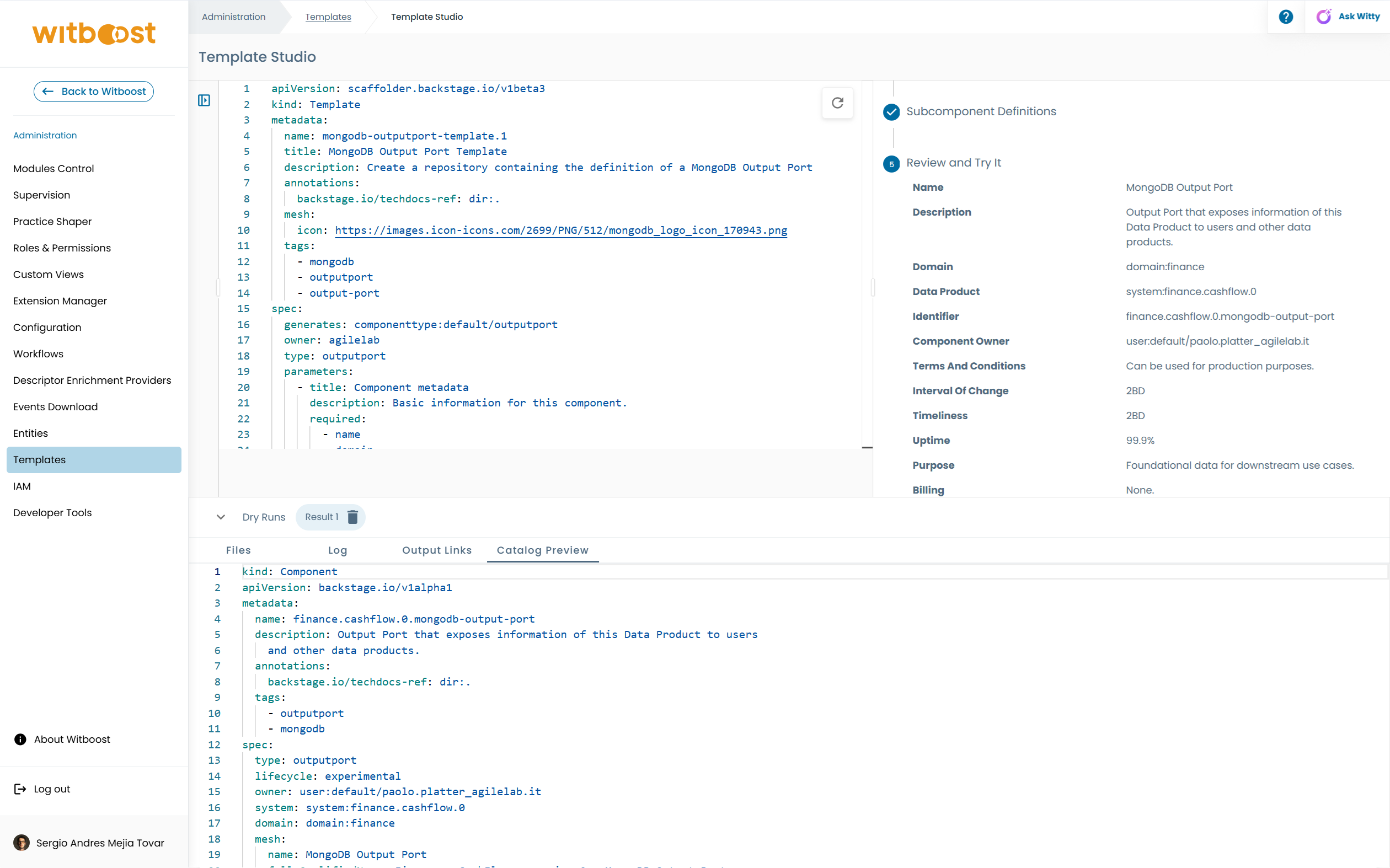
Currently, the Template Studio has some limitations that you should be aware of:
- Since the form context is automatically updated as you perform modifications, some behaviours you expect to work might not correctly work. This is especially noticeable when working with pickers having dependencies on other fields of the same form. You can solve it by clearing the form context with the trash button on the "Live Form Parameters" section. If this doesn't solve the issue, try refreshing the page and try again, or you may have misconfigured one of the pickers. Check this Gallery examples and the Witboost documentation to troubleshoot your templates.
- If you want to perform a dry-run of a specific template, you must have the corresponding yaml file opened. Having another file opened will result in an error.
Nunjucks
Nunjucks is a templating language for JavaScript that is used by the templates to take the inputs provided by the user and use them to create the new component's repository and metadata.
Before diving into template development, it's a good idea to go through the documentation. It's extensive and well done.
Along with the functions and features described there, some useful features of Nunjucks that really help in developing templates are described here: Nunjucks Patterns.